Scratch Tabs Logo SCRATCH_TABS

A Complete Developer Workspace.
Zero Installation.

Monaco-powered editing. Split-screen views. Powerful transformations. 40+ formats. All running 100% in your browser.

Built on Monaco. Supercharged for Developers.

The same editor that powers VS Code, enhanced with features designed for rapid data manipulation and workflow automation.

// Monaco-Powered

Professional Code Editing

  • → Syntax highlighting for 38+ languages
  • → IntelliSense auto-completion
  • → Multi-cursor editing
  • → Find & replace with regex
  • → Code folding & minimap

// Split-Screen

Side-by-Side Editing

  • → Resizable dual-pane view
  • → Independent tab sets per side
  • → Compare files live
  • → Copy between panes
  • → Persistent layout per workspace

// Rich-Text

Beyond Plain Text

  • → TipTap-based rich editor
  • → Image embedding support
  • → Background textures (grid, lines)
  • → Live markdown preview
  • → Scroll-sync between views

// Diff-Engine

Smart Comparison

  • → Side-by-side diff viewer
  • → Unified diff mode
  • → Syntax-aware highlighting
  • → Compare any two tabs instantly
  • → Line-by-line navigation

// Tab-System

Unlimited Tabs

  • → Unlimited tabs per workspace
  • → Pin important tabs
  • → Drag-and-drop reordering
  • → Duplicate & split operations
  • → Group by language

// Persistence

Never Lose Work

  • → Auto-save every 2.5 seconds
  • → IndexedDB local storage
  • → Cursor position memory
  • → Per-tab undo/redo
  • → Instant recovery on reload
$ split_view --dual-pane
Split view editor

Polyglot by Design.

Automatic detection and syntax highlighting for every language and format you work with. Paste anything - it just works.

// Programming Languages (18)

JavaScript TypeScript Python Java Go Rust C++ C# PHP Ruby Kotlin Scala Groovy R Bash SQL Swift Perl

// Data Formats (11)

JSON CSV YAML XML NDJSON GraphQL HTML CSS SVG Markdown Plain Text

// Infrastructure (5)

Dockerfile Terraform/HCL cURL TOML Apache VHost

// Config & Logs (4)

INI .properties Diff/Patch Stack Traces Access Logs

// Smart Views Enabled

Many formats get specialized interactive workbenches that understand structure and enable advanced operations including:

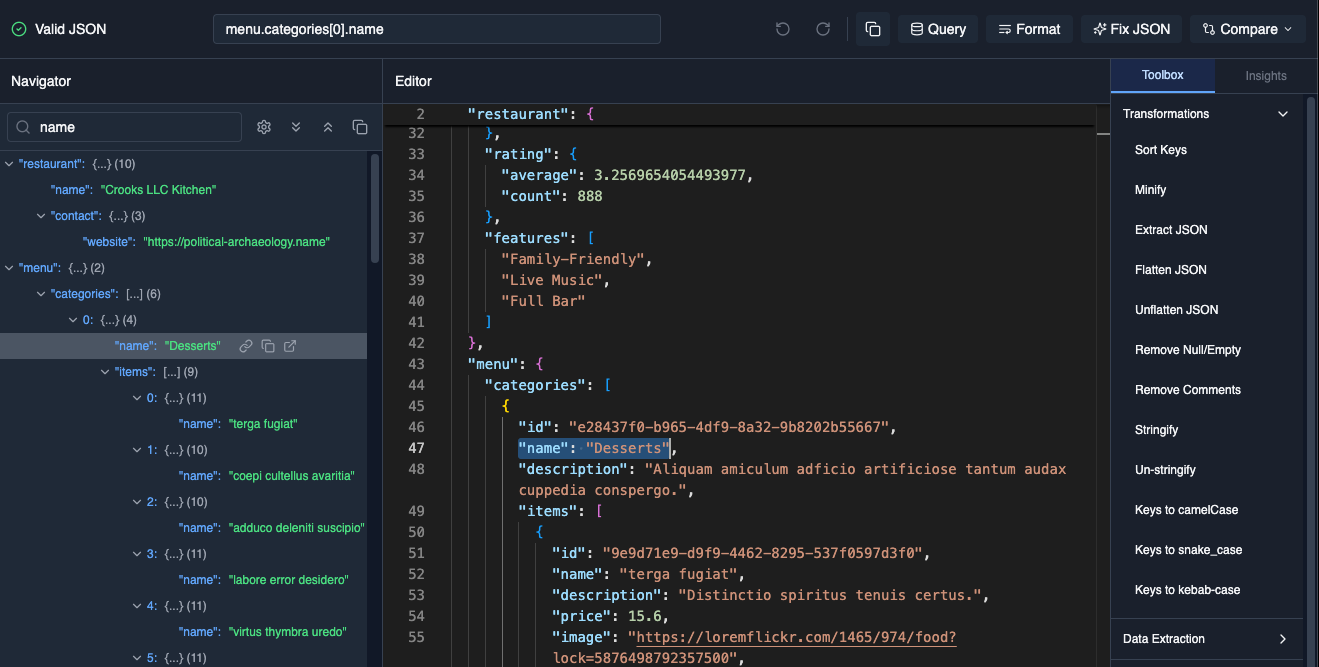
→ JSON: Tree view, path query, validation
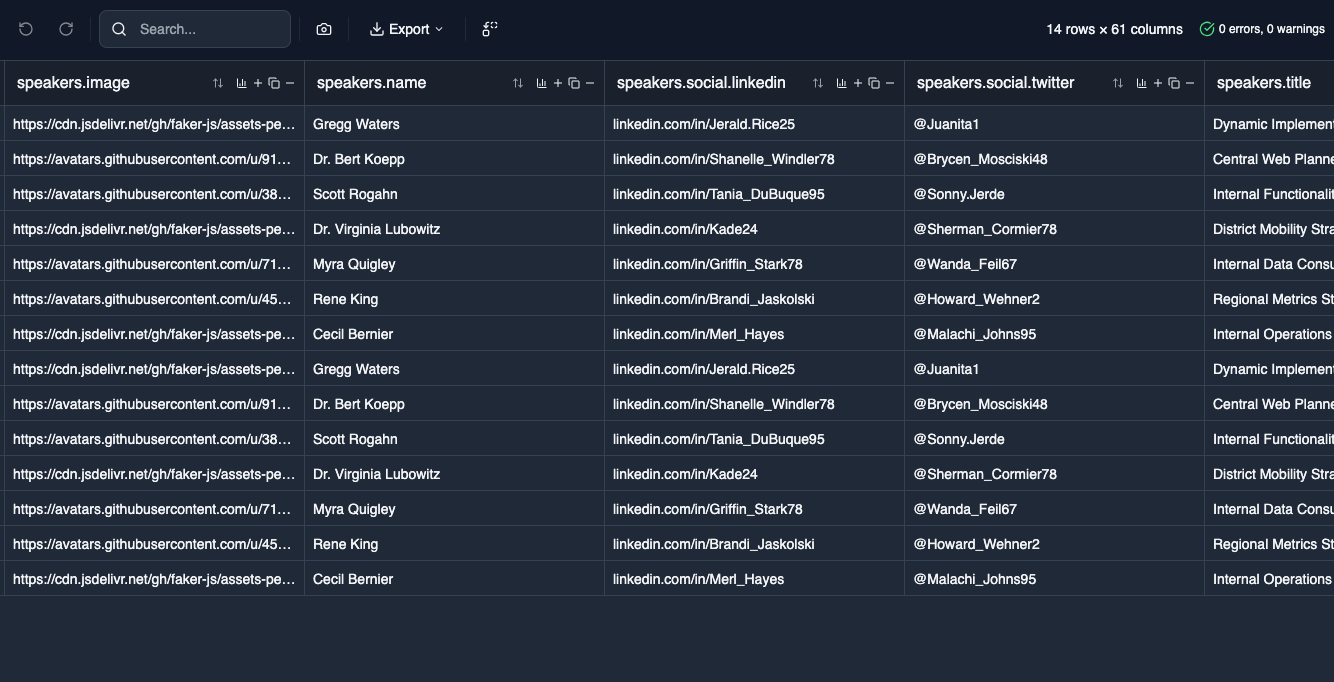
→ CSV: Table editor, sort, filter
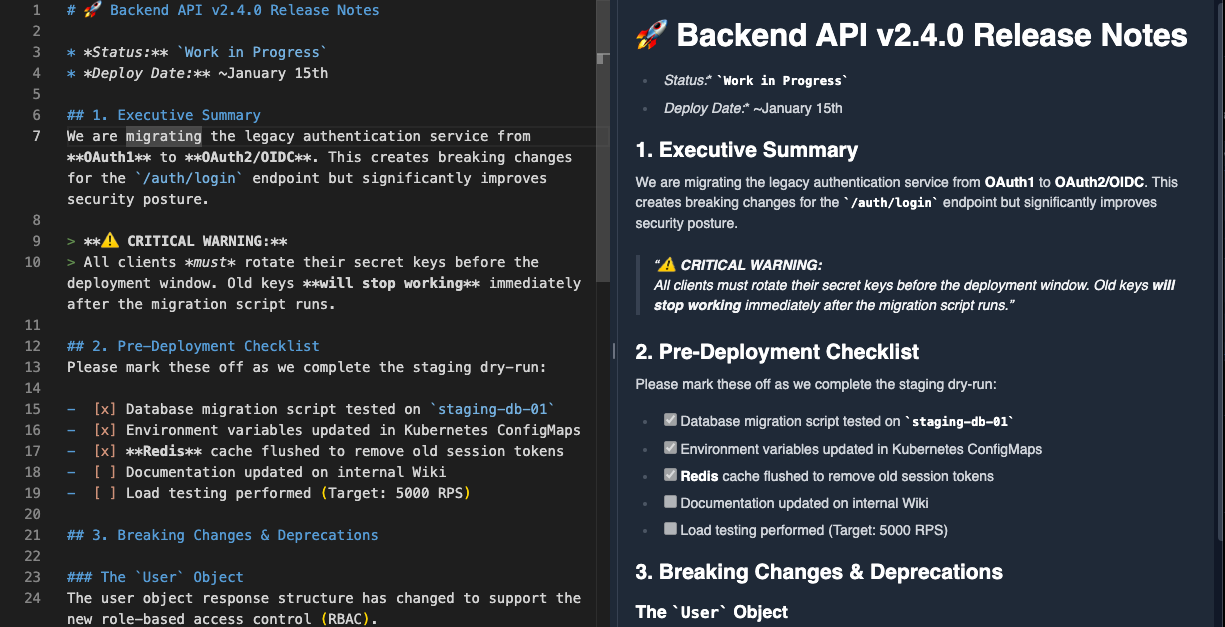
→ Markdown: Live preview, scroll sync
→ Diff: Side-by-side comparison
→ Stack Trace: Frame parsing
→ NDJSON: Log aggregation

Organize. Context-Switch. Scale.

Multiple isolated workspaces with persistent state. Switch between projects instantly without losing your place.

// Workspaces

Multiple Contexts

  • → Isolated tab collections
  • → Workspace notes & links
  • → Last-accessed tracking
  • → Instant context switching
  • → Auto-save before switch

// Tab-Operations

Advanced Tab Control

  • → Pin critical tabs
  • → Close left/right/all-except
  • → Duplicate tabs
  • → Group by language
  • → Tab history tracking

// Search-Engine

Find Anything, Fast

  • → Search across all tabs
  • → Filter by format/language
  • → Content preview in results
  • → Jump to matches instantly
  • → Workspace-scoped search

Automate the Tedious.

Powerful batch transformations with live preview. Apply operations conditionally across thousands of lines in seconds.

// 15+ Operations

→ Find & replace (regex)
→ Case conversions
→ Trim whitespace
→ Add prefix/suffix
→ Sort lines (asc/desc)
→ Remove duplicates
→ Reverse order
→ Number lines
→ Duplicate lines
→ Extract matches
→ Add/remove blank lines
→ Custom JS snippets

// Conditional Logic

Apply transformations only to lines matching:

→ Contains/not contains text
→ Starts with/ends with pattern
→ Regex pattern matches
→ Blank/non-blank lines
→ Specific line numbers
→ Line ranges (e.g., 10-50)

Live Preview Before Apply

↓ EXAMPLE
Transformation preview

// AI-Powered (Client-Side)

→ Text Summarization: In-browser AI using transformers (no data sent to servers)

→ More offline AI-powered features to follow

Your Data, Your Way.

Share tabs via URL or export entire workspaces. All privacy-first, with no data touching our servers.

// URL-Sharing

Shareable Links

  • → Generate shareable URLs
  • → Content compressed in hash
  • → Never hits server logs
  • → Format-specific trimming
  • → Size validation built-in

// Import-Export

Workspace Portability

  • → Export as ZIP archive
  • → SHA-256 integrity checks
  • → Version compatibility (1.1.0)
  • → Conflict resolution on import
  • → Preserves all metadata

// Clipboard

Smart Paste Detection

  • → Auto-format on paste
  • → Image paste support
  • → Clipboard history tracking
  • → Paste to new tab
  • → Format auto-detection

Small Features. Big Impact.

Keyboard shortcuts, macros, themes, and polish that makes the difference between good and great.

// Macros

Record & Replay

  • → Record keystroke sequences
  • → Playback single iteration
  • → Replay to end (continuous)
  • → Cursor movement tracking
  • → Selection operations

// Shortcuts

Keyboard-First

  • → Tab management hotkeys
  • → Split view controls
  • → Workspace switching
  • → Macro triggers
  • → Search activation

// Appearance

Light/Dark Mode

  • → Toggle between themes
  • → System preference sync
  • → Persistent across sessions
  • → Per-tab font sizing
  • → Preview mode toggle

// Auto-Format

Paste Intelligence

  • → Detects minified content
  • → Auto-formats on paste
  • → Language detection
  • → Confidence scoring
  • → Manual override option

// Performance

Optimized for Scale

  • → LRU model caching (10 max)
  • → Debounced saves (2.5s)
  • → Lazy content loading
  • → Cursor position caching
  • → Content sampling for detection

// Offline-First

Works Anywhere

  • → 100% browser-based
  • → No network required
  • → IndexedDB persistence
  • → Service worker ready
  • → Air-gap compatible

READY TO LAUNCH?